The problem: brightness, optics and acoustic comfort compete
A high-brightness projector has several heat-sensitive zones in a compact enclosure and is often used close to people.
The light source, optical engine, power electronics and image-processing board do not necessarily want the same airflow. A fan that cools the power supply can push warm air toward the lens or create a jet that couples into an acoustic panel. A fan that is quiet at low duty can lose pressure margin after the inlet grille and dust filter load. The layout must therefore be evaluated as a thermal and acoustic system.
Start with the heat map and the audience condition. Record the operating mode, brightness setting, ambient temperature, mounting orientation, inlet and outlet restrictions, noise target and required service interval. Separate measured data from assumptions. Use the installed airflow measurement guide to define the probes and the fan selection guide to establish the duty point.

Map the optical and power zones before choosing fans
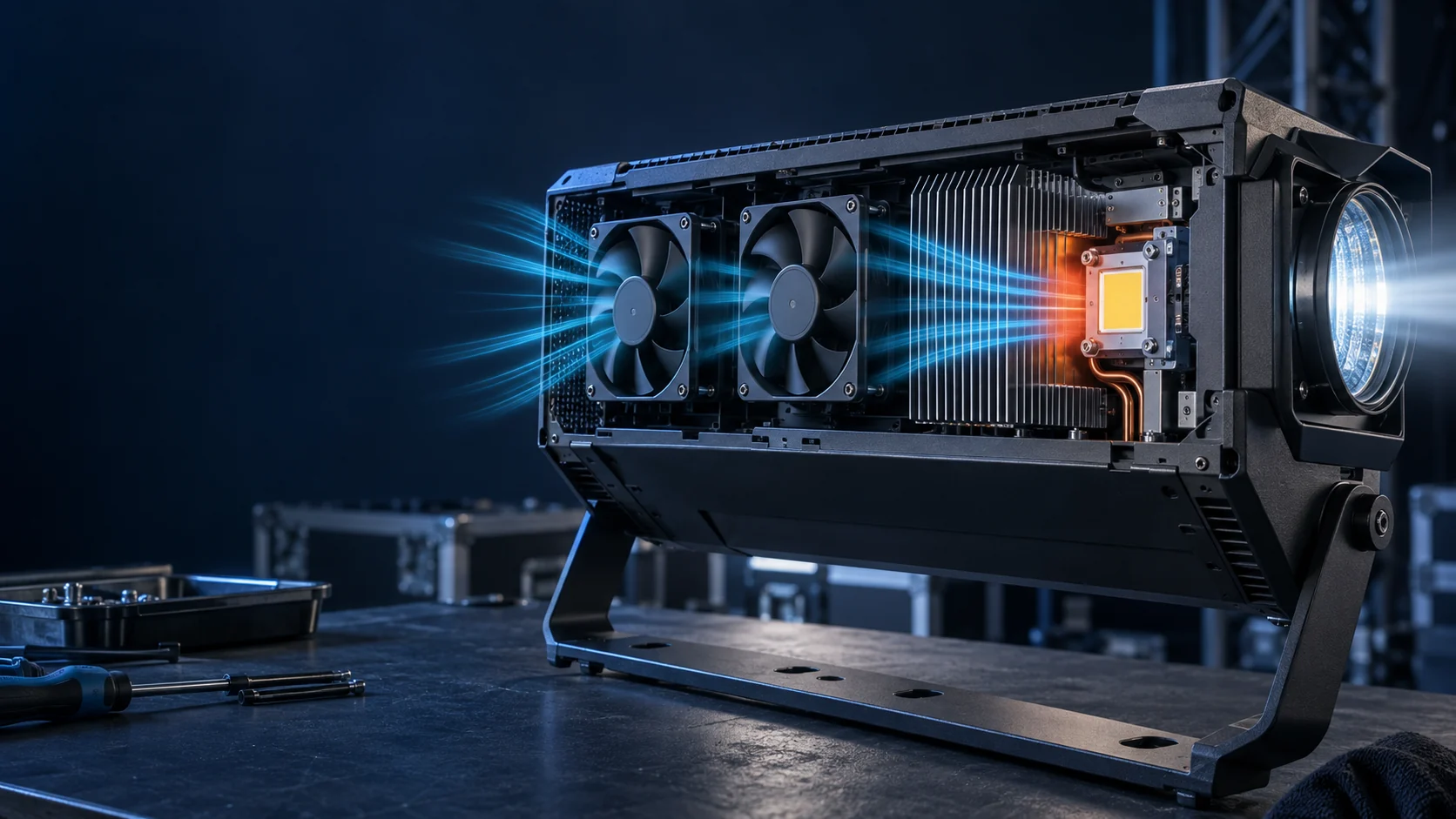
A projector layout should show where heat enters the air, where the lens and optical surfaces must be protected, and where warm air can leave without returning to the inlet. Draw the fan, filter, heat sink, outlet, acoustic treatment and cable bundles on one airflow diagram. Mark the temperatures that are measured and the temperatures that are only estimated. This prevents a fan selection from being approved against a room-average temperature while a local optic is exposed to a hot pocket.
If two fans interact, test them together. One fan can pressurize a compartment while another creates a short circuit to the outlet. Review the pressure balance and the physical partitions, not only the direction arrows. For a centrifugal blower, check the inlet and outlet transition; for an axial fan, check the straight length and nearby obstruction. The best layout is the one that gives each zone a predictable path at acceptable sound and power.
| Zone | Risk | Validation evidence |
|---|---|---|
| Optical engine | Drift, contamination or hot spot | Local temperature, airflow direction and dust control |
| Light-source/power bay | High heat and loaded filter | Heat-sink temperature, pressure and current |
| Inlet/outlet | Recirculation and grille noise | Inlet/outlet temperatures and flow map |
| Acoustic structure | Tonal coupling or obstruction | Noise spectrum and fan/mount vibration |
Choose fan location by the real pressure path
The inlet and outlet are part of the fan. A grille, filter, narrow slot, heat sink, diffuser or acoustic baffle can shift the operating point. If the fan is placed too close to an obstruction, the flow can separate and create extra noise. If the outlet is too close to the inlet, the projector can recirculate warm air while the fan continues to report normal speed.
Create a pressure-drop budget and compare it with the airflow and static-pressure curves. Measure or estimate each restriction, then validate the final intersection in the enclosure. A higher free-air number does not guarantee a lower optical temperature. If the projector uses a variable command, test the lowest duty that can start and maintain flow against the loaded path.
Validate noise where the audience sits
Projector noise is judged by people, so the measurement geometry matters. Define microphone distance, direction, background level, projection mode, fan command and room condition. Record broadband level and tonal peaks. A fan can meet an average dBA target while producing a narrow whistle that is more noticeable in a quiet room. Mounting stiffness, grille openings and cavity dimensions can amplify that tone.
Use the fan noise and resonance guide method to separate bearing, airflow, PWM and resonance causes. Test the actual lens cover, acoustic foam, grille and mounting fasteners. If a quieter fan is proposed, compare the optical and power-zone temperatures at the same picture mode and brightness. Do not approve on sound alone when the thermal duty has changed.
Control speed without visible or audible instability
A projector may change brightness and internal heat faster than the enclosure can respond. The controller should avoid audible hunting, sudden speed steps and a low-duty command that cannot restart after a pause. Define minimum duty, start boost, ramp time, hysteresis and overrun. Test warm restart after a high-brightness mode and a cold start after storage.
If FG or RD is used, validate signal behavior with the production harness and controller. Pair feedback with optical-zone and power-zone temperature, pressure or airflow. A clean RPM trace is not proof that the outlet is open or that the lens is protected. The machine must decide what to do when feedback is lost, the filter loads or a sensor is out of range.
Check dust, orientation and ceiling installation
Projectors are installed on tables, shelves, walls and ceilings. Orientation can change bearing loading, drainage, filter access and the path of warm air. Dust from the room can load the inlet and settle on optical surfaces. Test the actual orientation and define the service access needed to inspect or replace the filter. If condensation is possible, document the environmental boundary and the equipment-level protection strategy.
Do not infer an IP rating, humidity capability or condensation guarantee from a generic fan family. Request the exact product documentation and validate the complete projector enclosure. The fan sample is one element in the path; seals, drains, filters, coatings and service instructions remain equipment responsibilities.
Use a layout prototype before freezing the enclosure
A quick prototype can answer questions that a CAD layout cannot: whether outlet air returns to the inlet, whether a grille creates a tonal peak, whether the fan jet reaches the heat sink and whether a cable or acoustic panel obstructs the path. Make the prototype representative of the final fan frame, filter, baffle, lens cover and mounting. Record what is missing so the result is not overgeneralized.
Run low, normal and high brightness modes, then repeat with a loaded filter condition if the service specification includes one. Map temperatures at the optical engine, power devices, inlet and outlet. Record airflow or pressure, sound, current, command and feedback. The result should identify the next design change and the evidence needed before pilot build.
Acceptance and production change control
Freeze the accepted fan revision, mounting, connector, control behavior, filter, grille and measurement method. Define the limits for optical temperature, power-device temperature, airflow or pressure, sound, start/restart and feedback. A fan change that preserves the outside dimensions can still change the pressure curve, acoustic spectrum or current. Treat those as engineering changes requiring the appropriate regression test.
Keep the final report honest: distinguish measured projector data, supplier fan data and illustrative diagrams. If the system has no measured operating point yet, state that the sample is for evaluation. A clear record makes supplier communication faster and avoids turning a design-stage assumption into a public product promise.
How MEGA Tech can support the review
MEGA Tech supports custom DC, EC and backward-curved centrifugal fan development around the customer’s installed operating point. The useful input is the brightness modes, optical and power-zone heat loads, orientation, pressure path, noise target, voltage/control interface and sample enclosure, not a part number alone. Share airflow and static pressure at that airflow, temperature and altitude basis, voltage tolerance, control interface, connector, envelope, noise target and life assumption. Samples should be evaluated in the representative air path before a production decision.
The boundary is important: MEGA Tech supplies and validates fan-side hardware and does not supply coils, liquid loops, controllers, cabinet safety design or emergency ventilation. A supplier discussion can start with the fan selection guide, the MEGA Tech products catalogue or contact MEGA Tech with the required operating conditions.
Engineer FAQ
Q: Should a projector use one fan or separate zone fans? A: It depends on the heat map, pressure path, contamination boundary and acoustic layout. The answer should come from a measured or validated path.
Q: Is a quiet free-air fan enough? A: No. Check sound and airflow at the installed grille, filter, baffle and outlet restriction.
Q: Why test ceiling orientation? A: Orientation can change bearing loading, drainage, recirculation and service access.
Q: Can PWM eliminate projector fan noise? A: PWM may control speed, but tonal noise can also come from blades, grille, mounting and cavities. Measure the actual assembly.
Q: What should be sent for a sample recommendation? A: Heat loads or temperatures, pressure/airflow target, envelope, voltage, control, noise target, orientation and environmental assumptions.
Questions for a Design Review
- Which optical surfaces and power devices are the protected thermal loads?
- What is the pressure drop of the inlet grille, filter, baffle and outlet?
- Where will the audience be relative to the fan and tonal noise source?
- How do table, wall and ceiling orientations change the path?
- What are the minimum-duty startup and warm-restart requirements?
- Which fan, enclosure or acoustic changes require a regression test?
Use brightness modes as the thermal load cases
A projector’s thermal load is tied to its operating mode. Define the lowest normal mode, the typical presentation mode and the highest sustained brightness mode. Include image processing, power conversion and any lamp or LED driver state that changes heat. Record the time to reach thermal equilibrium and the fan command throughout the transition. A short demonstration can miss a slow optical-engine temperature rise.
For each mode, map the optical and power-zone temperatures, inlet and outlet temperatures, pressure or airflow, sound and power. Note the enclosure orientation and room condition. If the projector has an automatic brightness or fan-control loop, capture the sensor signal and the resulting duty. The purpose is to see whether the layout remains predictable as the picture mode changes.
Check acoustic paths created by grilles and cavities
A grille, slot, baffle or cavity can turn a broad fan sound into a tonal peak. Inspect the inlet and outlet geometry at the same time as the fan selection. Compare the open prototype, production grille and acoustic treatment with a repeatable microphone position. If the sound changes when a cover is installed, the enclosure is part of the acoustic system and the fan should not be judged in isolation.
Use a spectrum or narrow-band observation to identify blade-pass, motor or structural components. Check whether a small speed change moves the tone into a more noticeable band. Then compare the thermal result at the same picture mode. A quiet change that reduces delivered flow is not a successful cooling change; it is a different trade-off that needs an explicit decision.
Validate the production service path
Projector service access can change the fan path after the prototype is approved. A removable filter may not seal the same way, a cable may be rerouted, or a replacement fan may use a different connector depth. Include those service actions in the pilot review. After a filter replacement, verify orientation, gasket compression, pressure, airflow and sound. After a fan replacement, verify the operating point and control interface rather than relying on the outside dimensions.
Keep the final record understandable to a service technician: identify the fan position, connector, airflow direction, filter condition, measurement points and the symptom that should trigger escalation. The engineering team should be able to compare a field report with the original acceptance trace and decide whether the issue is fan, path, control or sensor related.
Make the final layout decision traceable
The final projector layout should show the fan position, flow direction, filter, grille, baffle, optical boundary, power devices, microphone position and service access. Attach the operating-mode trace and identify the measured operating point. If the layout uses separate paths, state which zone each fan protects and how a failed or restricted path is detected. If the layout uses one shared path, state how recirculation and thermal gradients were ruled out.
A traceable decision makes future product variants easier to review. A larger lens, different brightness target, new acoustic cover or alternate fan may require a focused retest rather than a completely new investigation, but only when the original evidence clearly identifies the assumptions. Keep the diagram and data together with the released enclosure revision.
Check the visual, acoustic and thermal experience together
A projector review should include the picture mode, audience position, enclosure temperature and fan sound in one observation. A change that reduces noise but raises the optical temperature may be unacceptable during a long presentation; a change that improves cooling but creates a tonal peak may be unacceptable in a quiet room. Use the same mode and measurement positions when comparing layouts.
If the product has an automatic fan response, let it operate through the full transition rather than forcing a fixed speed for the entire test. Record the command, feedback and temperature response. The goal is a stable user experience supported by a measured cooling path, not a single attractive number from an incomplete test.
Projector release note for the next build
Keep the cover, grille and acoustic-treatment revision beside the next thermal and sound trace. The combined record makes a layout change auditable instead of relying on memory. Add the picture mode, audience position, microphone location, fan command, feedback trace, optical temperature and power-zone temperature. When a serviceable filter or replacement fan changes, repeat the operating point and sound check rather than approving by outside dimensions alone.