A Warm Chamber Can Hide a Hot Electronics Bay
A 3D printer can hold the right chamber temperature and still overheat its power supply, controller board or stepper drivers.
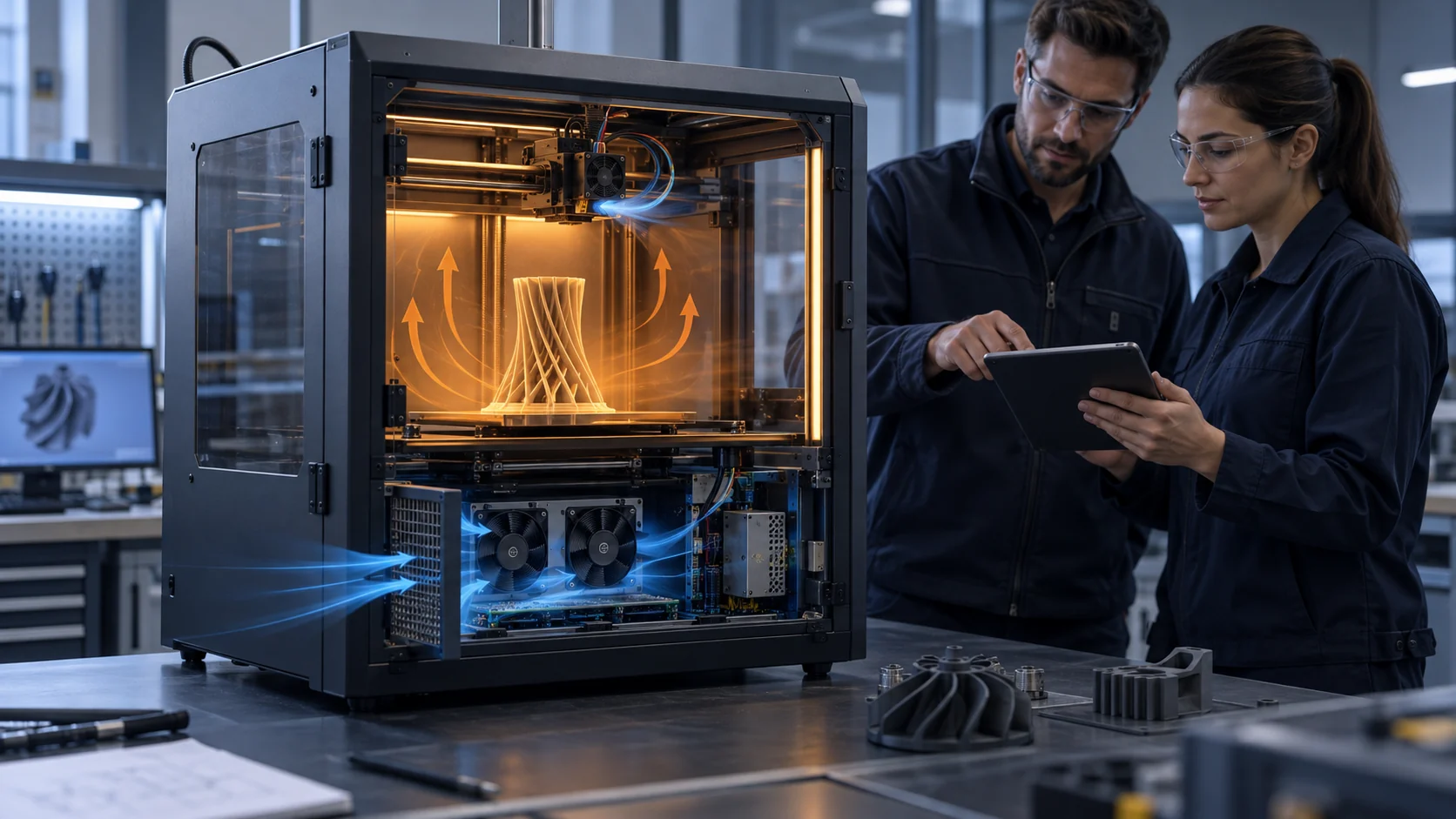
The cooling problem in an enclosed 3D printer is not one temperature and one fan. The print chamber may need warm, stable air for ABS, ASA, polycarbonate or nylon, while the controller, power supply and motor drivers need air that stays inside their own component ratings. If the electronics bay borrows air from the chamber, the printer can satisfy the material process and quietly spend its electrical reliability margin at the same time.
This failure often appears late. The printer starts normally, the hotend reaches its setpoint, the first layers look good and the chamber sensor reports an acceptable value. After a long print, however, the power supply may derate, a stepper driver may approach its thermal protection point, or a controller may become intermittent. A fan can continue to rotate and report a normal FG signal while its inlet is already warm and its airflow is short-circuiting around the board.
Prusa's enclosure guidance warns that some printer parts are more susceptible to higher enclosure temperatures, and its thermal-model documentation treats the electronics location as part of the calibration condition. Klipper exposes separate controller-fan and temperature-fan concepts for the same reason: the fan function and the temperature being protected must be named. The engineering question is therefore not whether the printer has a fan, but whether the installed path protects the named component under the warmest intended print.
This article focuses on electronics-bay cooling for enclosed FDM printers. The numerical examples are planning estimates, not universal printer limits or MEGA product ratings. Replace them with the component datasheet, the actual enclosure geometry, the fan curve, the local ambient and the acceptance temperature agreed by the machine team.
Define the Electronics Thermal Contract
Before choosing a fan, state which component is protected, from which air, at which print condition and against which limit.
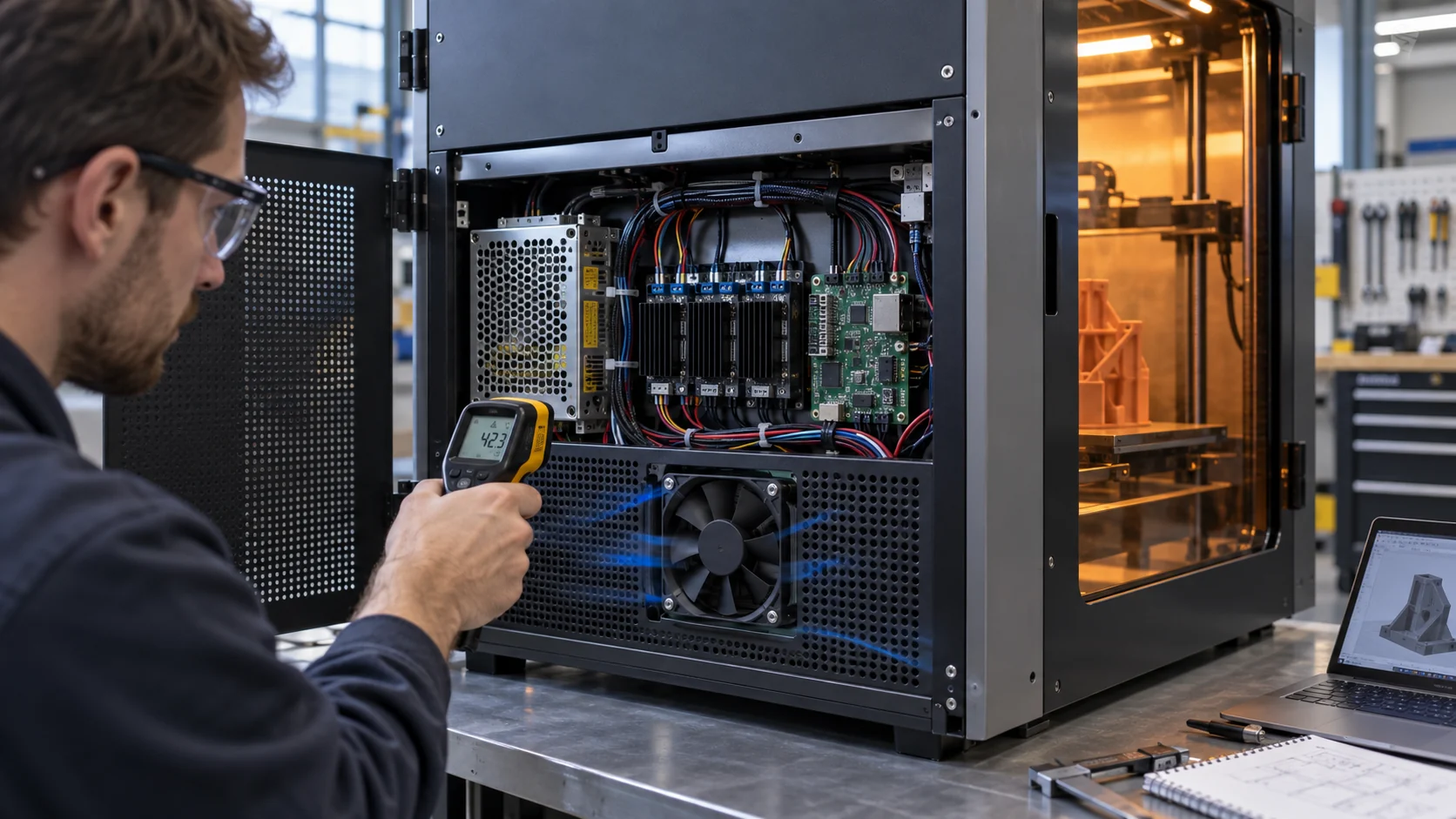
Write the electronics cooling requirement as a contract rather than as a fan description. Identify the power supply, main controller, stepper-driver heat sink, display electronics and any motor or communication module that sits inside the enclosed volume. For each one, record the relevant ambient or case-temperature rating, the load state, the allowed temperature margin and the sensor location. A board temperature measured next to an inlet is not the same evidence as a driver temperature measured inside the recirculation pocket behind a cable bundle.
Define at least three states: cold start with the chamber near room temperature, settled warm-chamber printing and the end of a long print when the structure and electronics have absorbed heat. Add the worst approved material and ambient, not only the easiest PLA job. If the product is intended for an industrial floor, add the workshop dust condition and the filter or grille state that maintenance is expected to support.
A useful record includes fan inlet temperature, fan outlet or downstream temperature, named board and heat-sink temperatures, supply voltage at the connector, command duty, RPM or FG feedback, fan current and the printer operating state. The record should also state whether the chamber door is closed, where the exhaust leaves, whether an external PSU is used and which firmware fan mode is active. Without these boundaries, two teams can report different temperatures while believing they tested the same printer.
Prusa's thermal-model documentation is a helpful reminder that the electronics location can change the model's behavior. That does not create a universal temperature threshold for other printers; it shows why the enclosure, sensor position and component arrangement belong in the validation record rather than in a generic cooling note.
| Item | Define before fan selection | Evidence at acceptance |
|---|---|---|
| Protected load | PSU, controller, drivers and other named heat sources | Each component temperature at the worst print state |
| Available air | Room air, filtered air or chamber air with measured inlet temperature | Fan inlet temperature and recirculation check |
| Air path | Grille, filter, cable field, heat sinks, duct and outlet | Pressure or installed airflow at the final geometry |
| Control | Voltage, PWM or voltage control, FG/RD behavior and start command | Command, voltage, current, RPM and restart result |
| Service state | Clean, loaded and post-service condition | Recovery of pressure, temperature and fan margin |
| Limit | Component rating plus project margin and response action | Pass/fail decision with sensor location recorded |
Use a Heat Balance Before You Quote CFM
The heat balance gives a first airflow floor; the pressure path and inlet temperature decide whether that airflow is real.
For a first estimate, use Q = P / (rho x cp x delta T), where P is the heat released to the air, rho is air density, cp is air specific heat and delta T is the permitted rise from fan inlet to outlet. Suppose the electronics bay dissipates 120 W, the inlet air is 30 C and the design allows a 15 K rise. Using 1.2 kg/m3 and 1,005 J/(kg K), the result is 0.00663 m3/s, or about 14 CFM. This is a useful screening number, not a fan order quantity.
If the electronics inlet is already 45 C because it shares warm chamber air, the same 15 K rise leads to a 60 C outlet. That may be acceptable for one component and unacceptable for another. If the permitted rise is reduced to 10 K, the same 120 W load needs about 21 CFM. The calculation changes because the thermal contract changed, not because a catalogue fan became better or worse.
The equation also assumes that the air reaches the heat sources. A cable bundle can create a bypass, a power supply can discharge directly back toward the inlet, and a board heat sink can sit in a dead pocket. Treat the heat-balance airflow as the minimum useful air crossing the protected load. Then select the fan where its P-Q curve intersects the complete installed system curve, including the grille, filter, bends, heat sinks and outlet.
Keep the estimate visible in the design file. When the measured result differs, the team can ask whether the heat load, inlet temperature, pressure loss, flow distribution or sensor location was wrong. Hiding the equation and quoting only maximum CFM makes that diagnosis much harder.

Build the Pressure-Drop Budget Around the Bay
A small electronics compartment can be more restrictive than its opening suggests.
Draw the path from the fan inlet to the protected component and then to the outlet. List the free area and estimated loss for the external grille, filter, fan guard, cable field, heat sink, power-supply vents, board-side duct and outlet. A fan installed behind a perforated panel does not see the same duty as a fan in free air. The restriction is created by the complete path, not by the fan label.
Here is an illustrative pressure budget: inlet grille 12 Pa, filter 18 Pa in the clean state, cable and connector obstruction 8 Pa, power-supply and board passages 24 Pa, and outlet grille 10 Pa. The clean total is about 72 Pa. If the filter reaches 35 Pa in service and the cable routing becomes more obstructive after production assembly, the service path may approach 95 Pa. The candidate fan must be checked at both points.
If the fan delivers 18 CFM at 72 Pa but only 11 CFM at 95 Pa, the 14 CFM heat-balance floor is no longer met in the defined service state. The answer might be a larger inlet, a better outlet, a shorter cable path, a different fan curve or a lower electronics heat load. Increasing RPM without identifying the restriction can add noise and power while leaving a board-side dead zone untouched.
Use the pressure-drop budget to compare axial and centrifugal options. A short, open electronics compartment may suit an axial fan. A compact bay with a ninety-degree turn, narrow slot and distributed outlet may need a blower with a more useful pressure curve. The correct choice is determined by the installed duty, acoustic target, available envelope and control interface, not by fan type as a slogan.
| Path element | Clean estimate | Service review |
|---|---|---|
| Inlet grille and guard | 12 Pa | Check open area and nearby wall clearance |
| Filter | 18 Pa | Replace with the supplier curve at the service state |
| Cable and connector field | 8 Pa | Inspect the production harness, not the prototype |
| Power supply and board passages | 24 Pa | Measure whether air crosses the heat sources |
| Outlet grille | 10 Pa | Check back pressure and discharge recirculation |
| Clean-path planning total | 72 Pa | Use the final assembly for confirmation |
| Illustrative loaded total | about 95 Pa | Test before freezing the fan selection |
Interactive Model: See Margin Move With the Printer State
Change ambient temperature, path restriction, fan command and heat load to see why a normal command does not automatically mean a safe electronics bay.
The screening model below is deliberately qualitative. It is a design-review aid, not a CFD result, fan curve or printer safety controller. Move one input at a time and then combine them: a warm chamber raises inlet temperature, a loaded filter changes the operating point, a lower command reduces available cooling and a higher electronics load consumes the remaining temperature margin.
The useful question is not the displayed index. It is which combination deserves a representative test. If the model changes from a reference state to a review state, the test record should capture fan inlet temperature, pressure, voltage, command, RPM, current and the named board or heat-sink temperature at the same time.
Keep the Chamber and Electronics Air Paths Separate
A warm process volume and a cool electrical volume can share a machine without sharing the same air.
Prusa's enclosure guidance explains why a chamber is useful for materials such as ABS and ASA: slower and more stable cooling reduces warping. That requirement does not mean every part of the printer should be heated. The electronics bay should normally receive air from the coolest validated source available, with a defined exhaust route that does not discharge back into the intake or into the print chamber.
Isolation can be mechanical or architectural. Put the controller and power supply outside the chamber, add a sealed partition around the electronics bay, or create a dedicated cross-flow path with its own intake and outlet. A flexible enclosure panel is not automatically an adequate seal; inspect the door, cable entries, service opening and printed duct for paths that allow hot air to bypass the intended inlet.
If the electronics must remain inside the warm enclosure, measure the local air temperature at the fan face rather than relying on a chamber sensor several hundred millimetres away. The temperature near the power supply discharge can be substantially higher than the nominal chamber value. The fan needs to survive and deliver its duty at that local temperature, with the bearing, motor electronics and insulation system included in the review.
Do not solve a separation problem with a stronger fan alone. A higher-speed fan can move more warm air into the electronics bay, increase noise and raise auxiliary power while the component still sees an unacceptable inlet. Correct the air source and the discharge route first, then reselect the fan at the new operating point.
Validate Command, Feedback and Restart Behavior
The electronics fan is part of the printer control system, so a good thermal result also needs a good electrical interface.
A printer may control the electronics fan through a two-wire voltage output, a four-wire PWM interface or a temperature-based firmware object. Confirm which signal the mainboard actually supplies and what the fan expects. A PWM input, FG output or alarm line is not interchangeable just because the connector has the same number of positions. Verify the pinout, pull-up level, frequency range, logic threshold, startup voltage and fail behavior with the actual board.
Measure voltage at the fan connector during startup and during a settled hot print. A long harness, a small connector or a shared board trace can create a drop that is invisible at the power supply. If the fan starts reliably on the bench but stalls at a low command inside the machine, record the minimum start duty and the restart behavior after a short power interruption. The acceptance limit should include repeated starts, not only a fan that runs once.
FG or tach feedback confirms rotor-speed behavior; it does not prove that air crosses the controller board. Pair the feedback with the fan current, differential pressure or a validated flow proxy and the component temperatures. If the fan reports healthy RPM while the board temperature continues to rise, investigate inlet temperature, bypass, heat-sink contact and discharge recirculation before changing the firmware threshold.
Klipper's configuration reference exposes controller-fan and temperature-fan functions, while printer manufacturers implement their own names and protections. Use those concepts to structure the review, not to copy a configuration into a different machine. The firmware response to a missing fan, abnormal RPM or over-temperature condition remains a system-level responsibility.
| Check | Why it matters | Pass evidence |
|---|---|---|
| Start and restart | Low-duty or warm restart can expose a weak interface | Repeated starts at the specified voltage and command |
| Voltage at connector | Harness and shared-board drops change fan speed | Measured supply at startup and settled operation |
| PWM or voltage command | The control method sets the actual operating state | Command and fan response agree with the interface document |
| FG/RD behavior | Feedback and alarm logic need a defined failure response | Rotor feedback and fault response are recorded |
| Temperature result | Rotor speed alone cannot prove useful cooling | Named board and heat-sink temperatures stay inside limits |
| Noise and power | A stronger setting can create a new product problem | Sound and fan watts recorded at the accepted duty |
Treat Dust, Filters and Service as Part of the Fan Design
An electronics bay that passes with a clean grille may fail after the first maintenance interval.
Workshop dust collects on fan blades, heat sinks and perforated panels. A filter can protect the board while adding pressure drop, or it can be installed with a gap that creates a bypass path and lets contamination enter. The design review should define whether the printer is open to the room, protected by a washable screen, equipped with a replaceable filter or intended for a clean production environment. Each choice changes the fan duty and the service procedure.
Use a repeatable service state. It might be a supplier pressure-drop point, a controlled restriction, a measured dust mass, a field-derived replacement condition or a defined number of operating hours. Do not write dirty filter without a way for the test team and service team to reproduce it. Record the pressure state, fan command, RPM, current, inlet temperature and component temperature before and after service.
A suspiciously low filter pressure drop deserves inspection. The filter frame may not be sealed, the service panel may be open or air may be bypassing the media. That condition can make the fan appear to have more flow while the electronics become contaminated. Add a visual seal check or smoke-tracer method where safe and appropriate, and inspect the actual production assembly rather than the ideal CAD path.
After service, verify recovery instead of clearing the alarm by software alone. The fan should return to the expected command and current, the pressure should return to the clean band, and the named component temperatures should return to the approved envelope. If the thermal result does not recover, check the fan direction, filter frame, cable path, heat-sink contact and recirculation before replacing the fan.
Representative Prototype Review
An anonymous development scenario shows how the electronics fan requirement becomes a sample that can be tested.
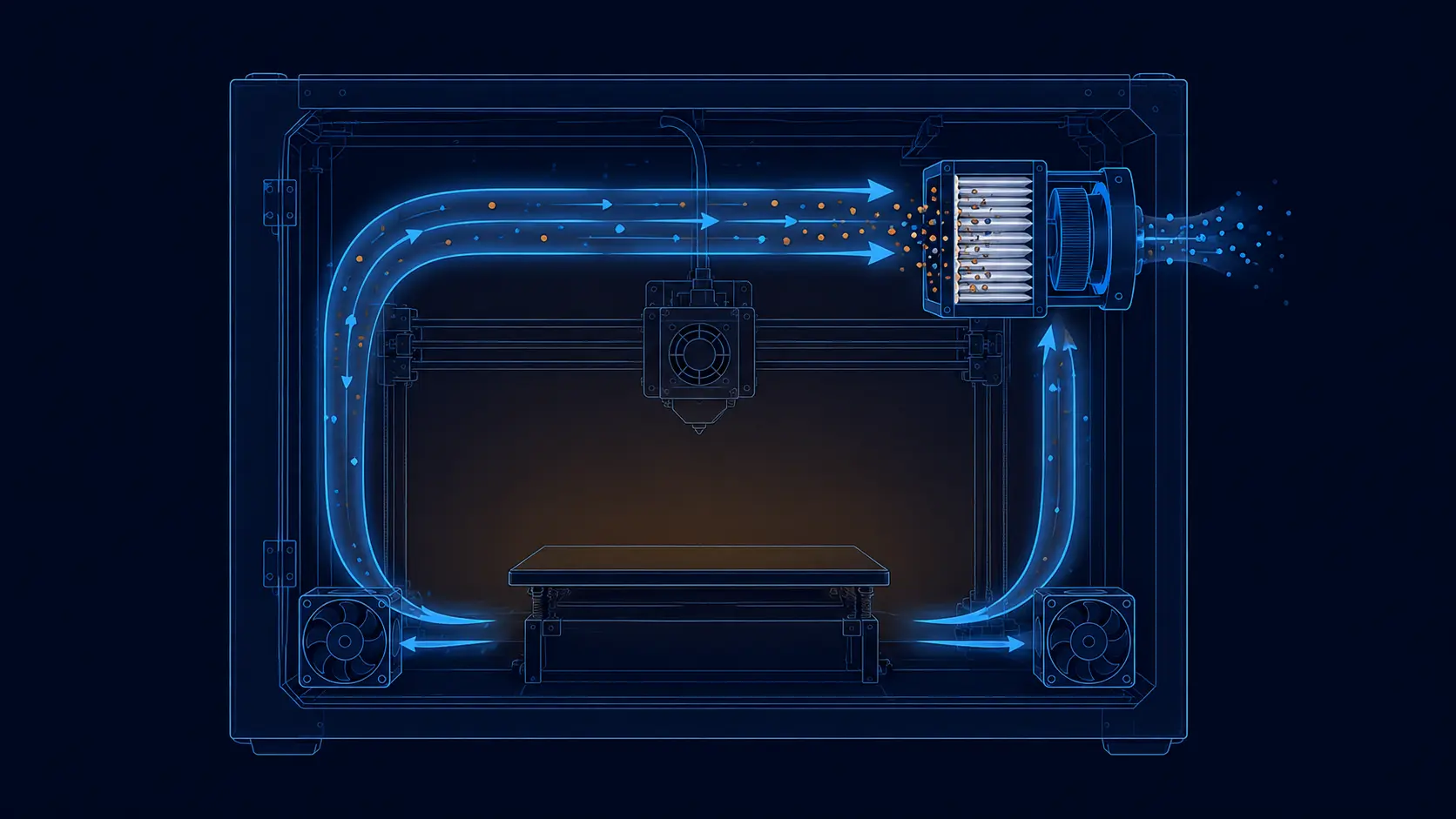
A startup team developing an enclosed FDM printer had a warm chamber target for engineering materials and a controller bay located below the build volume. The first prototype used a single rear exhaust fan. The chamber temperature looked stable, but the power supply inlet rose with the print and the stepper-driver temperature drifted upward during a long job. The fan was not necessarily too weak; the architecture had not separated the two thermal jobs.
The review drew a partition between the chamber and electronics bay, added a dedicated filtered inlet, and defined an outlet that discharged away from the chamber intake. The team supplied the available fan envelope, the board and power-supply heat estimate, the voltage tolerance at the connector, the control signal, the desired noise level and the warmest approved chamber condition. MEGA Tech compared an axial option for the short cross-flow path with a compact centrifugal option for the tighter duct variant.
The acceptance record compared clean and service air paths at room start and settled warm-chamber operation. It included fan inlet temperature, pressure, command, RPM, current, power-supply temperature and the hottest driver heat sink. It also included repeated starts at the minimum command and a post-service filter check. The point was not to claim that one fan size solves every printer. The point was to make the installed requirement measurable before the production drawing was frozen.
This is an anonymous representative scenario, not a named customer result or a guaranteed performance claim. The transferable lesson is that a custom sample becomes useful when the machine team supplies the real thermal zones and the fan supplier can validate the operating point inside the actual mechanical path.
How MEGA Tech Can Support a 3D Printer Electronics Fan
MEGA Tech develops custom cooling fans around the installed zone, not around a catalogue number alone.
MEGA Tech develops custom DC cooling fans and compact centrifugal blowers for the real operating condition. For an enclosed 3D printer, customization may involve the frame or thickness, airflow direction, pressure target, connector and cable length, PWM response, FG or RD feedback, bearing configuration, mounting detail, shroud interface or a replacement fan matched to the machine's actual duty. Axial fans can suit a short electronics cross-flow; a backward-curved centrifugal blower can suit a narrow duct or a right-angle path. The final choice comes from the measured pressure-flow requirement and thermal result.
For a first review, send the electronics heat load, protected component and allowed temperature, chamber temperature by material, fan inlet temperature, airflow or static-pressure target at that airflow, enclosure drawing, grille and filter details, available envelope, voltage range at the connector, control and feedback interface, connector, noise limit, duty cycle, life assumption and first-build quantity. A short video or trend log showing when the board or power supply overheats is often more useful than a free-air CFM target.
We can support an early-stage sample, a replacement for an installed fan or a production-oriented variant after the representative path is validated. We can also review whether a current fan is working in the correct pressure region, whether a custom cable or connector is required, and whether the control floor leaves enough restart margin. The customer's final machine remains the acceptance fixture.
Our boundary is deliberate. MEGA Tech supplies and customizes cooling fans and fan samples; we do not supply the printer heater, main controller, firmware safety logic, filter media, fume extraction system, fire protection concept or final product compliance. Thermal runaway protection and safety approval stay with the printer designer.
Recommended Fan Starting Points
These catalogue series may be suitable starting points for this application. Final selection depends on the installed airflow, static pressure, voltage, noise target and operating environment.
Request a sample for validation on your equipment.
Engineer FAQ: Electronics Cooling in Enclosed 3D Printers
Short answers to the questions that should appear in a thermal design review.
Q: Can the electronics fan use chamber air? A: It can only be accepted after the local inlet temperature, component temperature and fan life condition are verified for the warmest intended print. In many designs, a separate fresh-air path is easier to control.
Q: Is a normal RPM reading proof that the controller is cooled? A: No. RPM proves rotor feedback. It does not prove that air crosses the board, power supply or driver heat sink. Pair it with inlet temperature, pressure or a validated flow proxy and component temperatures.
Q: How much airflow does a 120 W electronics bay need? A: A first-pass heat balance gives about 14 CFM for a 15 K rise at typical room-air properties. The installed fan must still be checked at the grille, filter, cable and outlet pressure, and at the actual inlet temperature.
Q: Should a stronger fan fix a hot power supply? A: Not automatically. Check warm-air recirculation, discharge location, pressure loss, heat-sink contact and whether the fan is drawing the intended air. Higher speed can add noise and power without fixing a wrong path.
Q: What is the best chamber temperature? A: It depends on the material and printer design. Prusa's guidance identifies enclosure value for materials such as ABS and ASA, but the chamber target must be set by the machine team and separated from the electronics limit.
Q: What should a custom fan sample prove? A: The installed airflow or pressure point, inlet temperature, named component temperatures, command, voltage, current, RPM or FG, startup and restart behavior, noise where relevant and the clean/service state of the final assembly.
Q: Can MEGA Tech provide the full printer cooling system? A: MEGA Tech provides custom cooling fans and samples. The printer manufacturer retains responsibility for heaters, controllers, firmware protection, filters, fume handling, fire safety and final compliance.
Questions for a 3D Printer Cooling Design Review
Use this checklist before freezing the electronics bay, fan interface or enclosure drawing.
- Which component defines the electronics cooling limit: the power supply, controller board, stepper driver or another named part?
- What is the fan inlet temperature at the end of the warmest approved print, and where is it measured?
- Does the electronics bay draw fresh air, chamber air or a mixture, and what prevents discharge recirculation?
- What is the clean and service pressure-drop budget for grille, filter, cable field, heat sinks and outlet?
- What airflow is needed from the heat balance, and what installed P-Q point proves that airflow?
- What happens if RPM feedback is normal but the board temperature rises or the filter bypasses?
- Has the fan started and restarted repeatedly at the minimum command and minimum connector voltage?
- Which measurements will be retained with the production sample: inlet temperature, pressure, command, voltage, current, RPM, noise and hotspot temperature?
- Which safety and firmware protections remain outside the fan supplier's responsibility?